Jira projects and client billing accounts answer different questions. A project holds the issues a team works on. An account is the bucket Daylight uses to send those hours toward a client for billing. You need both, and they do different jobs.
A Jira project holds the work
A Jira project groups issues in one place. It gives the team a board, a permission scope, and a project-level report. Native Jira records time against an issue inside that project.
Native Jira has no client account. The project is the only grouping it offers. An agency that bills clients sometimes creates one project per client to work around this. Daylight removes that need by adding accounts on top.
A client account is a separate billing bucket
A client account is a billing bucket that is separate from the Jira project (Reports and approvals). People pick an account when they log time. Time logged directly in Jira uses the project's default account.
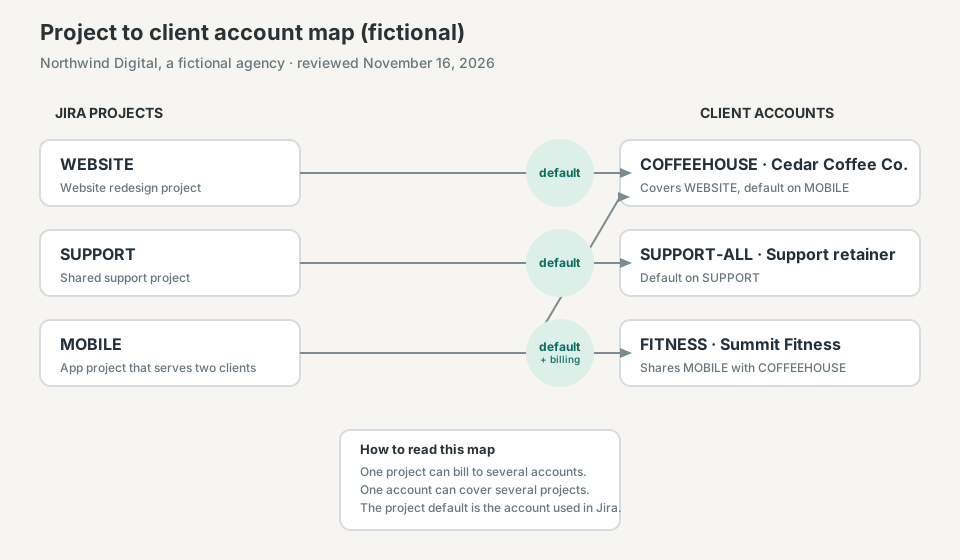
One project can bill to several accounts. One account can cover several projects. This lets an agency organize work by type while billing each client separately.
Map the projects to the accounts
For the fictional agency Northwind Digital, three projects feed three client accounts. WEBSITE bills to the COFFEEHOUSE account by default. SUPPORT bills to the shared SUPPORT-ALL retainer. MOBILE serves two clients, so it links to COFFEEHOUSE and FITNESS, and COFFEEHOUSE is the project default.
What the project default does
The first account linked to a project becomes its default (Reports and approvals). When a person logs time in Daylight, the account starts on the project's default and they can change it (Log time in Daylight). Direct Jira logs always use the project default.
The default matters for reconciliation. A direct Jira log with no review lands on the default account. If the default is wrong, the hours bill to the wrong client until someone corrects the entry.
A worked example that reconciles
Priya logs 11 hours in one week for Northwind Digital. She keeps the default account on WEBSITE and SUPPORT, and she picks FITNESS on MOBILE instead of the COFFEEHOUSE default.
| Project | Hours | Account picked |
|---|---|---|
| WEBSITE | 4h | COFFEEHOUSE (default) |
| SUPPORT | 5h | SUPPORT-ALL (default) |
| MOBILE | 2h | FITNESS (changed) |
The project totals are 4h, 5h, and 2h. The account totals are COFFEEHOUSE 4h, SUPPORT-ALL 5h, and FITNESS 2h. Both views sum to 11 hours.
Project totals describe where the work happened. Account totals describe where the hours are billed. The two reports agree because each entry carried the intended account.
You do not need one project per client
With accounts, a shared project can bill several clients, and one client can receive hours from several projects. A person changes the account on the entry without moving the issue. That is the difference the map shows.
How this compares with Tempo accounts
Tempo uses accounts to organize projects and initiatives, and links each account to one or more Jira spaces (Tempo: Organizing data using accounts). A Jira space can have a default account. Daylight also groups client hours across projects, sets a default account for each project, and stops a closed account from taking new time.
This article uses Daylight's reports and logging-time instructions and Tempo's account documentation, reviewed on November 16, 2026. The agency, projects, clients, and hours are fictional. It does not report a customer result.
Read the reports instructions to add client accounts, link them to projects, and set the project default in one place.