A public holiday shows on the timesheet as a day off. It lowers the hours you are expected to work that week. Your expected hours come from your work schedule, and a holiday day subtracts from that total. The timesheets help documents this behavior, and the reports help covers how admins enter holiday sets.
What a holiday does to expected hours
The timesheets help states that a holiday shows under its date and counts as a day off. It also states that a half day halves that day.
Your expected hours come from your work schedule. Without a schedule, they are the daily target on Monday to Friday. The total at the top shows logged hours against expected hours, for example 32:00 / 40:00.
Record holidays for one location (admins)
Use Settings → Work schedules and holidays to add your schedules and holiday sets. This workflow appears in the reports and approvals help.
- Select Add schedule and enter the hours for each weekday.
- Select Add holiday set and add the days off.
- Mark a half day where needed, or add dates from a calendar file (
.ics). - Assign each schedule and holiday set to a team or to a person.
Each team carries its own holiday set. A date entered for one location does not change the expected hours of another team. This fits teams that work in different countries or regions.
Normal week versus holiday week
The example below compares a normal week with the same week after a holiday is added.
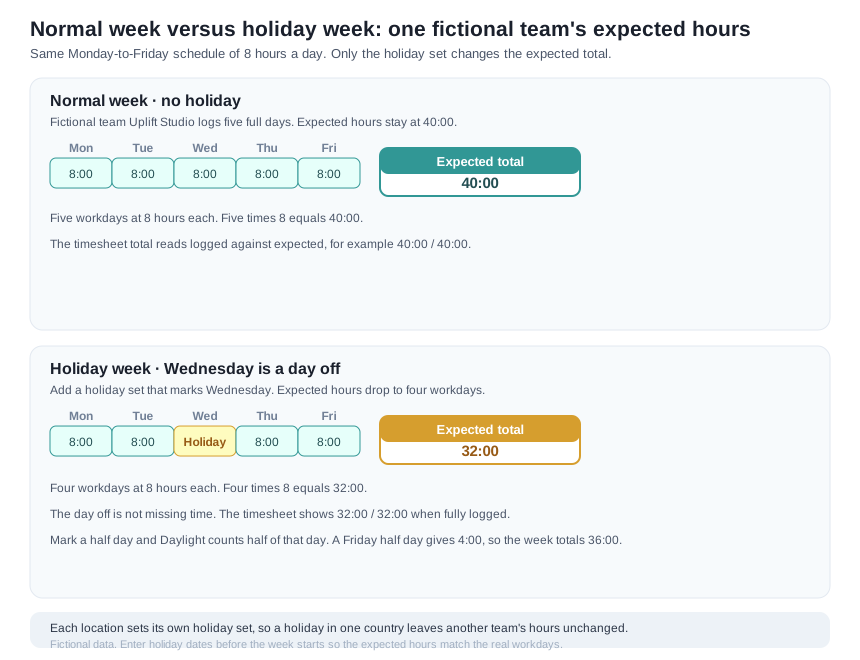
Both weeks use a Monday-to-Friday schedule with eight hours per day. A normal week has five workdays, so its expected total is 40:00. A holiday set that marks the Wednesday as a day off leaves four workdays. The expected total becomes 32:00.
Five workdays of 8 hours total 40:00. Four workdays of 8 hours total 32:00. The example is fictional team data, and the totals reconcile to that arithmetic.
For a half day, Daylight counts half of that day's hours. A Friday half day gives 4:00 expected instead of 8:00. That week shows 36:00 expected.
Why a holiday matters for billing review
A holiday week has fewer expected hours. Enter the holiday dates before the week starts so the expected hours match the real workdays. Then the team review shows the true difference between expected and logged time.
The reports help states that a person on holiday or leave for the whole month is not counted as missing. A correct holiday set keeps the coverage review useful for a holiday week.
Where to go next
Read the reports instructions to review expected hours across the team and export the totals.