A Jira worklog can show 1h 20m on screen, but the export writes 1.33. Jira stores the duration in seconds, and a CSV reader needs decimal hours. This page shows the conversion and why the two-decimal value does not remove your minutes.
Where Jira keeps the duration
Jira stores each worklog as a duration in seconds (Jira Cloud REST API, issue worklogs). The 1h 20m you read is a formatted display. The seconds stay exact underneath.
Daylight accepts 1h 30m, 45m, 1.5, and 1:30 on its timesheet grid, and keeps each entry at its exact minute value (Log time in Daylight). The display shows H:MM or decimal depending on your format. Neither changes the stored duration.
Convert H:MM to decimal
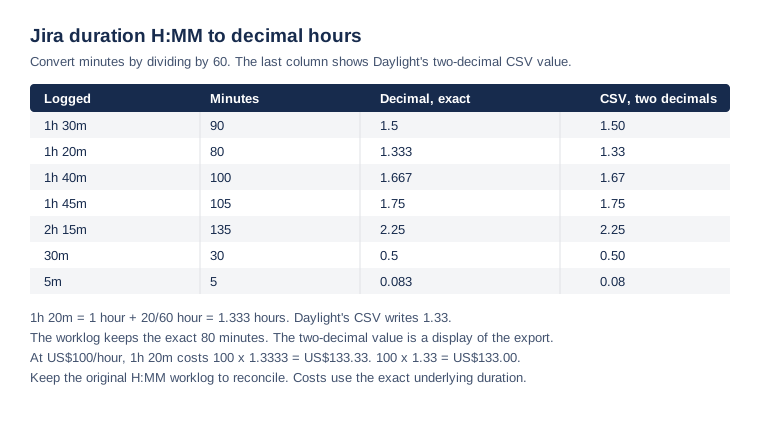
To convert for a CSV, divide the minutes by 60. Then add them to the hours. 1h 20m is 1 plus 20 divided by 60, or 1.333 hours. 1h 40m is 1 plus 40 divided by 60, or 1.667 hours.
The export is a rounded display
Daylight's report CSV writes decimal hours to two decimals, as 1.33 for 1h 20m (Reports and approvals). The cost uses the exact underlying duration, not the rounded display value.
At US$100 per hour, 1h 20m costs 100 times 1.3333, or US$133.33. Using the two-decimal 1.33 gives US$133.00. The two values differ by cents, and the worklog keeps the exact minutes.
Check one day against its entries
Sofia logs three entries on BILL-200 on the same day. The report sums them in seconds, then writes the decimal total.
| Entry | Duration | Decimal |
|---|---|---|
| Design the checkout | 1h 20m | 1.333 |
| Review the QA notes | 45m | 0.75 |
| Write the migration script | 2h 15m | 2.25 |
| Day total | 4h 20m | 4.333 |
1h 20m plus 45m is 2h 5m. Adding 2h 15m gives 4h 20m, which is 260 minutes and 4.333 decimal hours. Daylight's CSV writes 4.33.
Keep the worklog to reconcile
Keep the original H:MM worklog. It is the source of truth for the minutes. Use it to reconcile against the report. Daylight does not change your minutes when it exports. It rounds only the display value.
The sample report shows the same decimal export with a reconciled total row.
This article uses Atlassian's REST API documentation and Daylight's help pages and source, reviewed on November 15, 2026. The person, issue, and hours are fictional. The article does not report a customer result.
Read the reports instructions to review decimal hours, costs, and the export format in one place.